Every time you search something on Google, you see results.
Some are organic. Some are paid.
Most people cannot tell the difference. And if you are a freelancer or a business owner trying to learn Google Ads, that is the very first thing you need to understand. What are search ads and why do they appear above everything else on Google?
Let me walk you through it.
Watch the full walkthrough above (Urdu). English summary below.
Table of Contents
- What a business owner actually sees when they search on Google
- The top four positions and what they look like
- Paid vs organic: the actual difference
- Why this matters if you are a freelancer in Pakistan
- FAQ: Search ads explained
- The bottom line
What a business owner actually sees when they search on Google
Say a business owner in Lahore types “website development company” into Google.
Before any organic results, before any maps, before any blog posts, they see four listings at the very top. Each one has a small black label next to the URL: Sponsored.
Those are search ads.
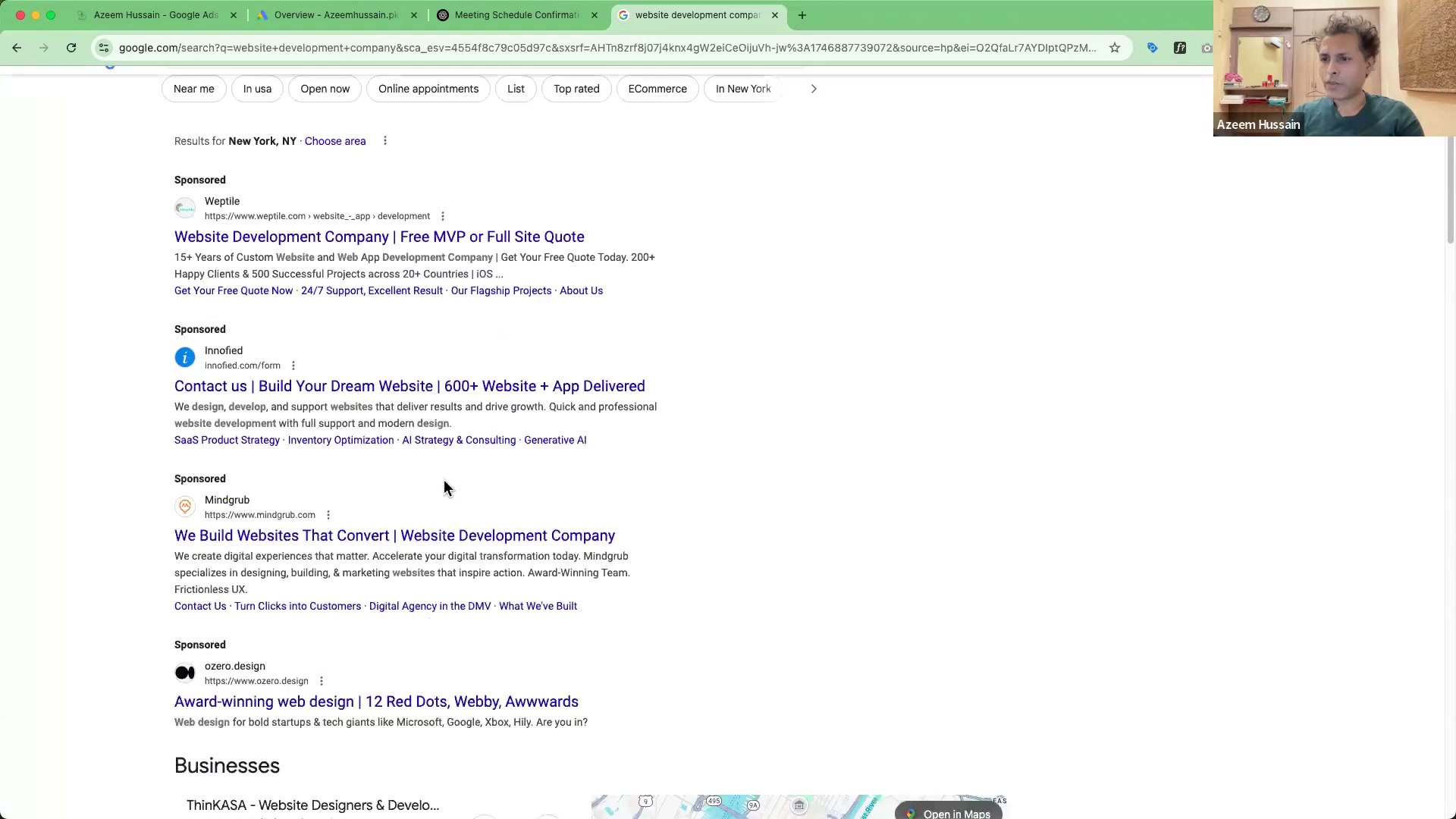
The businesses running those ads paid to be there. They did not earn that position through SEO. They bid on the keyword “website development company” inside Google Ads, and Google placed their ad at the top of the page when that search happened.
That is the core of it. A business chooses keywords. Google shows their ad when those keywords are searched. The business pays per click, not per impression. This is what the industry calls pay-per-click (PPC) advertising.
The top four positions and what they look like
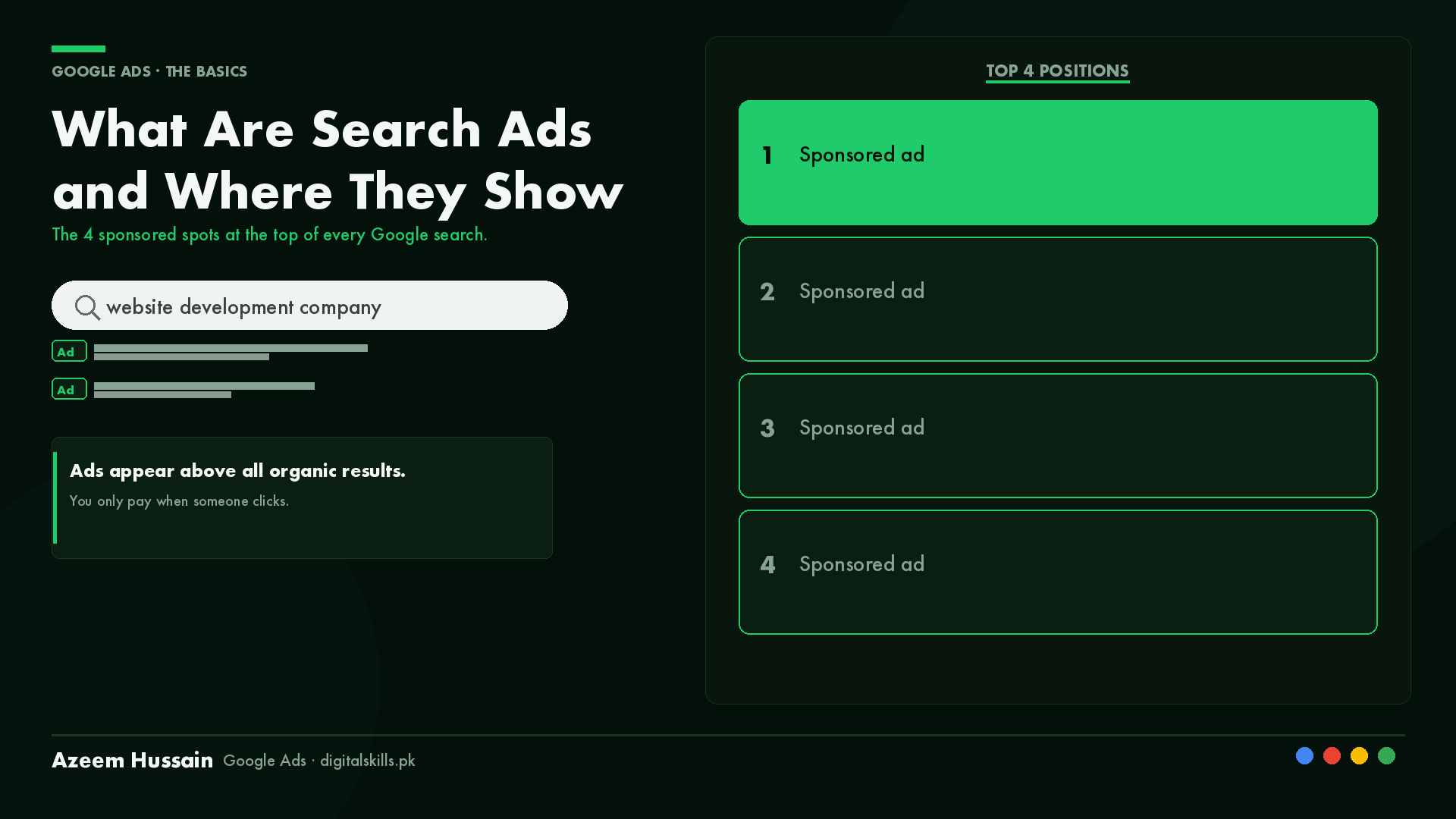
Google currently shows up to four sponsored results above the organic listings on most commercial searches.
Position 1 is the top of the page. Position 4 is just above where the organic results begin.
Each ad in those positions is built from the same components inside Google Ads. Here is the exact anatomy:
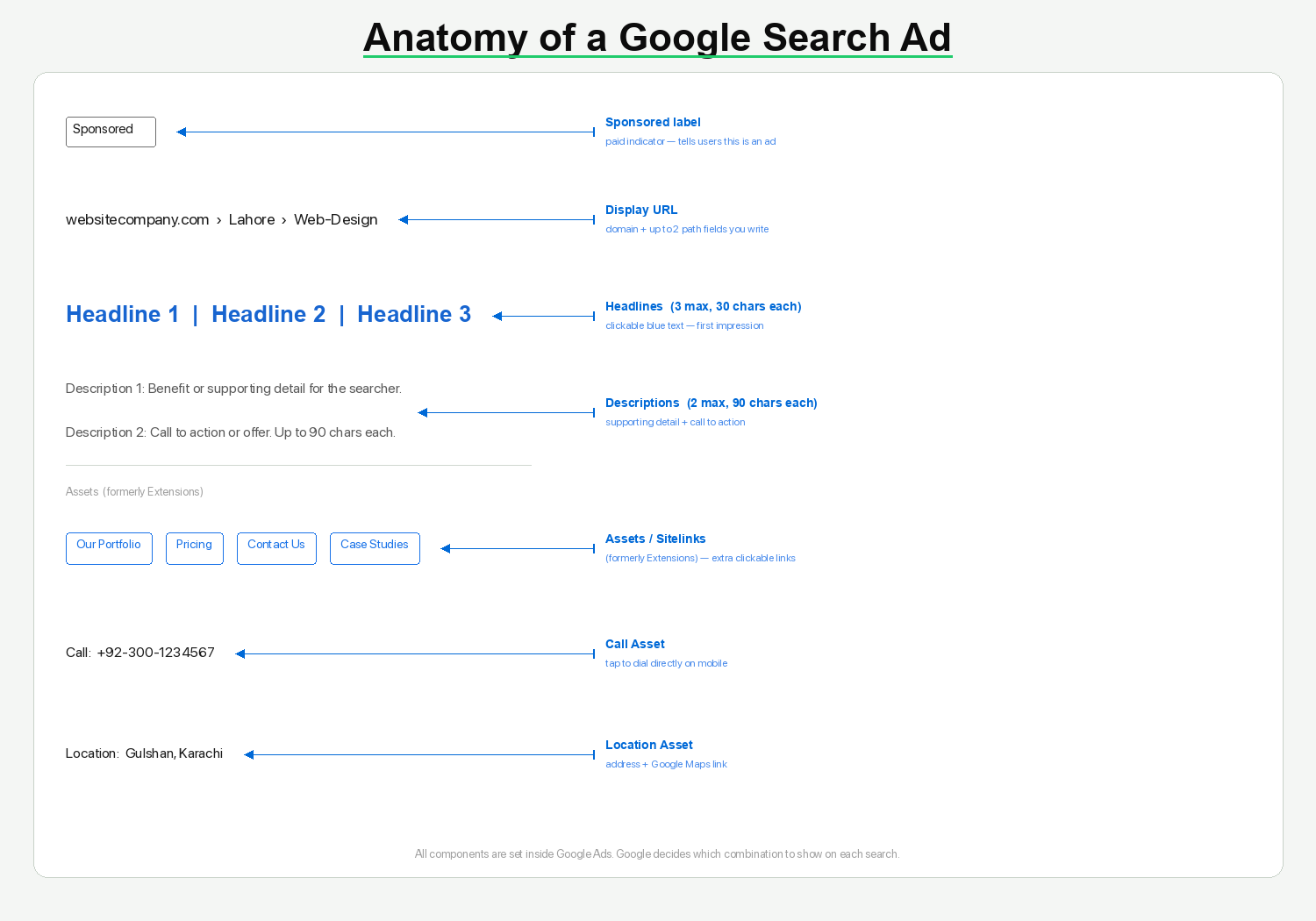
Headlines. You get three. Each headline can be up to 30 characters. Google shows two or three at a time depending on the screen and the query. The headlines appear as the clickable blue link at the top of the ad. This is your first impression, and it is where most of the copy work happens.
Descriptions. You get two. Each description can be up to 90 characters. They show below the headlines in smaller grey text. This is where you add supporting detail, a benefit, or a call to action.
Display URL. This is the green URL line between the headline and the description. It shows your domain plus two optional “path” fields you can customize. A website development company might show something like: websitecompany.com/Lahore/Web-Design. It does not have to match the actual page URL exactly. It is for readability.
On top of the base ad, Google Ads allows you to add extensions (now called Assets in the platform). Three common ones:
Sitelink Assets. Extra clickable links below the main ad that take users to specific pages. “Our Portfolio”, “Pricing”, “Contact Us”. These expand the ad’s footprint on the page and give the searcher more ways to click.
Call Assets. A phone number shown directly in the ad. On mobile, tapping it dials the number immediately. For service businesses, this is often where the most qualified leads come from.
Location Assets. Shows your business address below the ad. Links to Google Maps. Adds trust for local searches.
For a deeper look at how these ads are organized inside an account, see what is a Google Ads campaign and what are ad groups — those two posts cover the structure that sits behind every search ad you see.
For the official breakdown of how Google’s search ad format works, see Google’s own Search ads documentation.
Paid vs organic: the actual difference
Organic results are earned through SEO. Publishing content, building backlinks, improving your site’s technical structure. It takes months, sometimes years.
Search ads are paid. You bid. You win the Google auction. You pay per click.
The key thing to understand: they are not competing with each other. A business can rank organically on page one AND run search ads above that position at the same time. The paid spot and the organic spot are two separate systems.
For a new business or a product with seasonal demand, waiting for organic rankings is not always an option. Search ads give you SERP (search engine results page) visibility from day one. That is the trade — you pay per click instead of earning it over time.
Why this matters if you are a freelancer in Pakistan
Here is something worth knowing.
Google Ads freelancers in Pakistan are in a position most people in this space have not figured out yet.
Clients in the US, UK, and Canada are paying $500 to $2,000 per month for someone to manage their Google Ads. The work is the same whether you are sitting in Karachi or California. You log into the same platform, pull the same reports, run the same optimizations.
The gap in hourly rates between markets is significant. A well-trained Pakistani freelancer offering real results at honest fees is a serious proposition to a US-based founder spending $5,000 a month on ads.
But you need to know the platform cold. Not just the concept. The exact fields, the exact terminology, the structure of a real campaign.
Starting with search ads is the right foundation. This is the oldest, most documented ad format on Google. Once you understand how an auction works, how headlines and descriptions combine, and how extensions expand your ad, everything else in the platform builds on top of this.
FAQ: Search ads explained
What are search ads?
Search ads are paid listings that appear at the top of Google search results when someone searches a keyword that a business is bidding on. They are marked with a “Sponsored” label and appear above organic results. Businesses pay per click, not per view.
Are search ads worth it?
Yes, for most businesses with a clear product or service and a defined customer. Search ads put you in front of people already looking for what you sell, at the exact moment they are searching. Unlike display or social ads, you are not interrupting anyone. The main variable is bid cost: high-competition keywords cost more per click, so profitability depends on how well the ad converts.
How much do search ads cost?
There is no fixed price. You set a daily budget and a maximum bid per click, and Google runs an auction for every search. Cost per click can range from a few rupees on niche local searches to hundreds of rupees on competitive commercial terms. You only pay when someone clicks. For most Pakistani-run campaigns targeting US or UK clients, a daily budget of $10 to $50 is enough to generate real data in the first few weeks.
What is the difference between search ads and SEO?
SEO (search engine optimization) earns organic rankings over time through content, backlinks, and technical site quality. Search ads buy immediate placement through Google’s pay-per-click auction. They appear in separate sections of the SERP and are completely independent systems. A business can have both — an organic listing AND a paid ad — showing for the same search at the same time.
How many search ads show at the top of Google?
Google shows a maximum of four sponsored results above the organic listings on most commercial keyword searches. Occasionally fewer appear, depending on competition and the quality of ads bidding for that term.
Do search ads help if I already rank organically?
Yes. Running search ads while you also rank organically for the same keyword gives you two entries on the first page instead of one. Studies consistently show that total clicks increase when both are present, because you occupy more visual space and catch users who click ads by habit. The incremental cost per click is usually worth it for high-value keywords.
The bottom line
Search ads are the sponsored listings at the top of Google. Up to four positions. Each one built from three headlines, two descriptions, and a display URL. Extended with Sitelinks, Call Assets, and Location Assets when you set them up properly.
Organic and paid are separate systems. You can have both, or just one.
And if you are a freelancer in Pakistan learning this, you are not too late. Most markets still have more demand for skilled Google Ads managers than there are people qualified to do the work.
Learn the platform the right way and you have a skill that travels.
Want to go deeper? The full Google Ads Mastery course covers this and 50+ hours of real account walkthroughs, from campaign structure to bid strategy to conversion tracking.